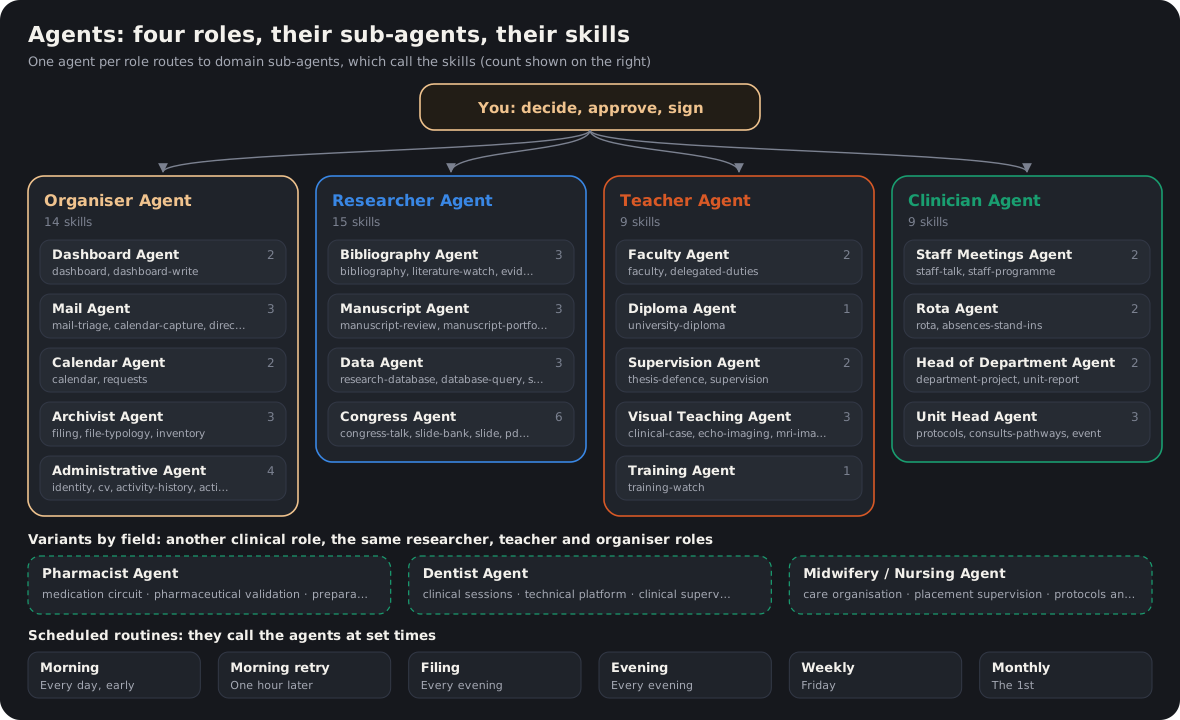
4 agents, one per role, 18 domain sub-agents and 47 skills. The agent receives the request, the sub-agent chains the steps, the skill does the work. You keep the decision.
Reference
The skills in detail
Here is the actual content of the skills of an academic hat, anonymized: role, trigger phrases, steps, absolute rules and mistakes already made. Use it as a model for writing your own. Order: orchestrators, congress and slide chain, imaging, staff meetings and teaching, career.
Common ground for the whole chain
- A single normative template for slides, owned by a single skill; in case of divergence, it prevails.
- Language: dialogue in French, slide content in English, unless instructed otherwise.
- Attribution: source and DOI mandatory for any data taken from PubMed (DOI in the notes, not on the slide).
- No heavy generation without approval for the specific step under way: full presentation, email, publication, scheduled task.
- Never delete, never overwrite: archive, and produce a new suffixed file.
1. Academic orchestrator (level 1)
Role: the single hat for university activity. It qualifies, routes and logs; it never itself produces a talk, a review or a bibliography.
Triggers: “my university activity”, “where am I with my articles”, “what do I have to prepare”, any university request with no named building block.
Explicitly excludes: consulting for industry, protocol review, invoicing, accounting, personal life. Rule: assignment follows the payer, not the tool.
Step 1 — qualify with one question
| Domain |
Content |
| A · Research and publications |
manuscript, thesis, dissertation, review, bibliography, cohort |
| B · Congresses and presentations |
talk, workshop, clinical case, slide, session, travel |
| C · Department and staff meetings |
staff meeting, schedule, laboratory, reading protocol |
| D · Career and outreach |
CV, history, supervision, learned societies |
| E · Teaching and training |
lectures, MCQs, semiology, tutoring, OSCE, exam-question review (docimology), diploma, training watch |
Step 2 — route
- Review → review skill; literature search → bibliography; scientific state of the art → synthesis; watch → literature watch; defense → defense; research database → database and query.
- Mandatory congress entry point: the presentation orchestrator, never bypassed. Direct call only for a single slide, a PDF figure, a clinical case or travel.
- Department: schedule (read-only), staff meeting. Career: CV, history, identity, annual reports. Teaching: faculty, training watch (which produces nothing itself), university diploma.
Rules inherited by all building blocks
- Never delete; calendar proposed, written only after “accept”; schedule strictly read-only.
- Every document produced is filed immediately in the root folder, never left in Downloads.
- No automatic sync of online storage: access on demand.
- One question at a time; scoping before any complex task; nothing is generated without approval for the current step.
Traces: an academic cockpit (deadlines, manuscripts, congresses, staff meetings, reviews), the anticipation board, a reference document for the hat. D-30 rule: any congress presentation triggers a preparation alert.
2. Congress presentation orchestrator
Role: router, never executor. It owns the entry-point question, scoping, final assembly, review and the shared slide basket.
Triggers: “make a presentation, a talk, congress slides”, “prepare my communication”, “state of the art”, “symposium”.
Architecture: a single tabbed HTML workshop, tabs always accessible even when empty: bibliography; online congress materials; bank of past presentations; imaging; analysis and annotation of a submitted deck (quality score, never automatic correction); storyboard and generation.
Step 0 — always asked first: start from scratch, from the bank, from updating a specific presentation, from a scientific question (delegated to the synthesis skill), or resume a recent presentation (all its slides loaded into the basket).
Absolute rules
- Never a full presentation, a batch of figures or media without approval for that step.
- Never restrict the bank to a selection chosen by the AI: exhaustive indexing.
- A single workshop, never an ad hoc page presented as a deliverable.
- Absolute fidelity of reused slides; visual harmonization at the very end, on request.
- Two figures actively sought per bibliography slide; never a flow diagram (CONSORT, PRISMA) in place of the central figure.
- Online congress materials limited to the scope of the subscription.
Technical points: the reference script lives on the user’s side (to be checked at the start of the session); a table of journals with their impact factor kept up to date by hand; the result always opened in the browser; a shared database never opened directly (working copy, then copied back and verified by checksum).
3. “Online” variant of the presentation orchestrator
Status: separate from the personal skill, which remains unchanged; designed for any physician, with no machine-specific paths. Starting point for a distributable offering.
Triggers: only on explicit request for the “online” version.
Structure: scoping (new presentation, update, merge), bibliography, past presentations (local folder), media bank (local folder), analysis and annotation, storyboard with timed rehearsal mode.
Excluded: subscription congress materials (copyright) and patient imaging (health-data hosting not covered).
Technical constraint: local HTML workshop, no server; each action produces a line to copy into the conversation.
Quality: one figure per slide, figures always cited, fidelity of reused slides, four bullets at most, slide-by-slide review before delivery.
4. Bank of past presentations
Role: index past presentations as thumbnails, display them in a gallery, and copy the chosen slides exactly as they are, never reinterpreted.
Triggers: only “reuse, recycle, pick from” one’s old slides.
A single canonical index, always reused and refreshed incrementally (file date and size), never recreated elsewhere.
| Item |
Rule |
| Language |
English on the slides |
| Format |
16:9, never 4:3 |
| Volume |
about one slide per minute |
| Citations |
“Author et al., Journal Year”, never a DOI on the slide |
| Fidelity |
reused slide strictly identical to the source |
| Harmonization |
at the very end, on explicit request |
| Final assembly |
always with explicit approval |
Scope before producing: topic and angle, congress and format, audience, three take-home messages written before the slides, available material.
5. Single slide (normative template)
Status: normative source of the template, applicable to the whole chain.
Step 0 — always ask for the mode
| Mode |
Content |
| 0 · Verification |
no layout touched; citation and summary in the notes |
| 1 · Layout |
reformat to the template with the images present |
| 2 · Rebuild |
start entirely from the source publication |
| 3 · Update |
add a second or third reference |
| 4 · Variant |
layout specified by the user |
Three absolute rules: no slide outside the template; no slide without the original figure extracted from the PDF (otherwise a flagged box and a list of PDFs to download); never large decorative numbers.
Template: white background, text on the left, figure on the right; bold title at the top with a colored rule; four to six short bullets, never full sentences; two figures stacked, never side by side; discreet citation at bottom right.
Mistakes already made, turned into rules: text too small, bullets as full sentences, too many numbers, invented subtitle, misplaced citation, “rebuild” mode that rephrases instead of starting from the source, style imported from a generic design skill. Never let a generic skill decide the style.
Automation: as soon as a source PDF is located, the figure is extracted and inserted, and the PDF is delivered alongside the slide.
Role: replace screenshots with programmatic extraction, at constant resolution, from the actual PDF.
Steps: 1) local copy of the PDF, never a screenshot; 2) render the page at high resolution; 3) locate the rectangle to extract, and if it is ambiguous, present the options rather than guess; 4) crop and insert into the right column, stacked below an existing figure, citation added only if missing.
Boundaries: the bibliography has its own mechanism for open-access articles; this skill is for a non-open-access article or a specific figure.
7. Online congress materials
Strict scope: only the congresses covered by your subscription.
Real incident: an unfiltered search returned a majority of results outside the subscription. Fix: systematic filtering by event type, including retroactively.
Constraint: materials are served in a secure viewer; manual download, never bulk download by script. The skill automates everything that comes after.
Steps: filtered search → selection page ranked by number of slides → 16:9 presentation from the selected pages, full morphology.
8. Bibliography
Full cycle: PubMed search → interactive selection → download → filing → Word and PowerPoint deliverables, one slide per reference even without a PDF.
Mandatory attribution: source and DOI link for any data presented.
Folders: an active cumulative bank, never emptied; a read-only PDF archive, always checked before re-downloading, never written to.
Eight steps: scope (topic and bibliography name); exhaustive search; enrichment of metadata and impact factor; checkbox table (year and impact sliders, access badge); retrieval of the selection; download (open access first, a single batch per session); filing; Word and PowerPoint generation.
Paywalled articles: legal access tools, then the university’s institutional access. Never bypass a paywall or a captcha.
9. Literature watch
Difference from the bibliography: a permanent feed that never empties, versus a one-off review. Founding rule: never have to go back to an article to make a slide from it; the slide is produced right away.
Construction: one feed per major theme, plus a cross-cutting feed (methods, guidelines, AI). Measure the annual volume of each feed before setting an alert, and aim for a few references per week after deduplication.
Query rules: no impact-factor filter (PubMed does not allow it); quality comes from a whitelist of journals; no isolated ambiguous acronym; a systematic exclusion block (comment, editorial, erratum, retraction); tighten a feed that is too large.
Absolute rule: nothing is deleted; a discarded reference moves to the “discarded” status and stays archived.
10. Scientific synthesis
Role: reasoning layer between the bibliography and the presentation: a question becomes an evidence table, compared against the slide bank to spot what is missing or outdated.
Steps: scope the question (population, intervention, comparator, outcome, never a raw keyword); multi-source search; check of the existing bank; filtering; structured extraction (never an invented number); evidence table: stopping point, validation mandatory; gap identification; output in the presentation format.
Boundary: never replaces the presentation orchestrator; it is one of its entry points.
11. Clinical case
Output: a single file that grows case by case, regenerated by a script from data files, never rewritten by hand.
Block of four slides: divider (number, title, sex, age, context, never a name); initial presentation; additional tests; course and follow-up.
Layout: text on the left, figures on the right, font size adapted to the volume, telegraphic style; a fixed palette.
Anonymization: no surname, first name or date of birth on the slides; the internal identifier goes in the notes.
12. MRI imaging
Principle: export → series classification → black-background presentation, four animated loops per slide, never still images by default.
Series classification by their technical markers (localizers, cine, T1 mapping, flow, late gadolinium enhancement, console captures).
Standard deck: title, long-axis cine, short-axis cine, T1 mapping, late gadolinium enhancement. Excluded by default: localizers, flow, secondary captures (except numerical quantification).
13. Echocardiography image bank
Principle: a hierarchical bank (workshop → case → exam), a persistent cache and scripts (never in a temporary folder), a processing pipeline in stages (metadata, thumbnails, classification, photos and videos, themes).
Classification in mandatory order: strain, spectral Doppler, 3D, color Doppler, 2D, other.
Output: four videos per slide, black background, no visible text, technical information in the notes, looped playback; integration into the presentation workshop.
Watch out: check the identifier of each exam before any grouping; two folders with similar names may be the same exam, or two different patients.
14. Echocardiography visit by visit
Difference: native lossless video (GIF degrades color Doppler).
Standard five-slide deck: parasternal views; apical views; diastole; right ventricle; strain.
View identification: always read the label burned in by the machine, never guess from anatomical appearance. Option: comparison between visits.
15. Staff meeting
Principle: always start from the history of past staff meetings before producing anything.
Step 0: index of staff meetings (theme, volume, families covered, themes never addressed), the files themselves, the slide bank.
| Mode |
Chain |
| 0 · History only |
stops after step 0 |
| 1 · Reuse |
bank, then slide to re-source |
| 2 · Literature review |
synthesis, then bibliography |
| 3 · Specific opinion |
synthesis, then targeted bibliography |
| 4 · Clinical case |
clinical case and imaging |
| 5 · Scheduling |
calendar only |
Format: short, about fifteen slides; beyond forty, it is no longer a staff meeting. End a review with a “what this changes for us” slide.
16. Faculty
Excludes the university diploma, which has its own skill.
The chain, always in this order: lecture to prepare → lecture delivered and uploaded → questions → exam-question review (docimology) → exam → deliberation.
Missions delegated to assistant professors: exam-question review (docimology), semiology, ECG tutoring, OSCE, each with its own content, pace and lead.
Anticipation: D-30 before a lecture (materials and questions ready), D-15 before an exam-question review (docimology) session.
17. University diploma
Typical rhythm: several seminars per year (in person and by video), exam, official results report.
Five modes: calendar for the year; mailing list (cross-checking results reports and email archives); in-person day; exam and results report (fixed format); daily watch of the dedicated mailbox.
Privacy: student names and grades stay in the local files, never copied into a published page.
18. Training watch
Role: pure watch, produces no content: collects, sorts, then hands off (diploma, faculty, presentation, clinical case).
Rules: access through an already logged-in browser, never entering credentials or signing up without validation; six items at most on the dashboard; a log so an item already seen is never flagged again.
19. Thesis defense
Difference from the review: the review is written; this skill prepares what will be said orally.
Automatic trigger: the weekly routine spots defenses at D-14 and produces the sheet at D-7.
| Role |
Sheet |
| Chair |
full sheet; welcome remarks and closing remarks; synthesis questions |
| Examiner |
short sheet, two or three remarks |
| Supervisor |
background and supervision, lighter criticism |
Golden rule: any item not found in a source is marked [TO BE CONFIRMED]; three reliable lines are better than ten plausible ones.
20. Manuscript review and follow-up
Two moments: the review (Word tracked changes and comments attributed to your name, never to “Claude”); lifecycle follow-up (co-author feedback, arbitration, versions up to submission).
Naming: each deliverable starts with the manuscript’s short name. One folder per manuscript: the untouched original, dated reviews, co-author feedback.
Scope: by default the scientific part in English, not the introductory chapters of a thesis.
Three levels: form and English (tracked changes); methodology (reasoned comment); reasoning (consistency of title, abstract, discussion), often the most useful.
Three flaws to check systematically: an outcome whose definition changes from one section to another; reference numbering that no longer matches the list; units that differ between text and tables (never decide alone).
21. CV
Sources: a central data sheet, identity, and PubMed for recent publications only.
Principle: never invent; missing data is marked [MISSING INFORMATION]; when sources contradict each other, present both and have the user decide. A decision already made is not asked again: write it into the skill.
Commands: generate, in English, update (with changes flagged), full version with identity and history.
22. Activity history
Difference from the CV: cumulative and detailed, enriched with each reported event, without waiting for a regeneration.
Strict attribution rule: collective work (for example a unit’s activity report) remains attributed to the collective, never merged with a personal achievement.
23. Annual reports
Absolute rule: the final document is always the previous year’s, duplicated then completed; the official template is never reformatted or reworded.
Log: one line per detected event (date, category, detail, source, status “to validate”, “kept”, “discarded”). Nothing enters the document without explicit validation, via checkboxes.
Strict exclusion: any consulting activity for industry, even if the email goes through an academic mailbox.
Deadline: set a D-30 alert before the submission date.