Common foundation
The Reactor, an anticipation dashboard
A single entry point that answers the question: what is coming up in the next few days, and what is ready?
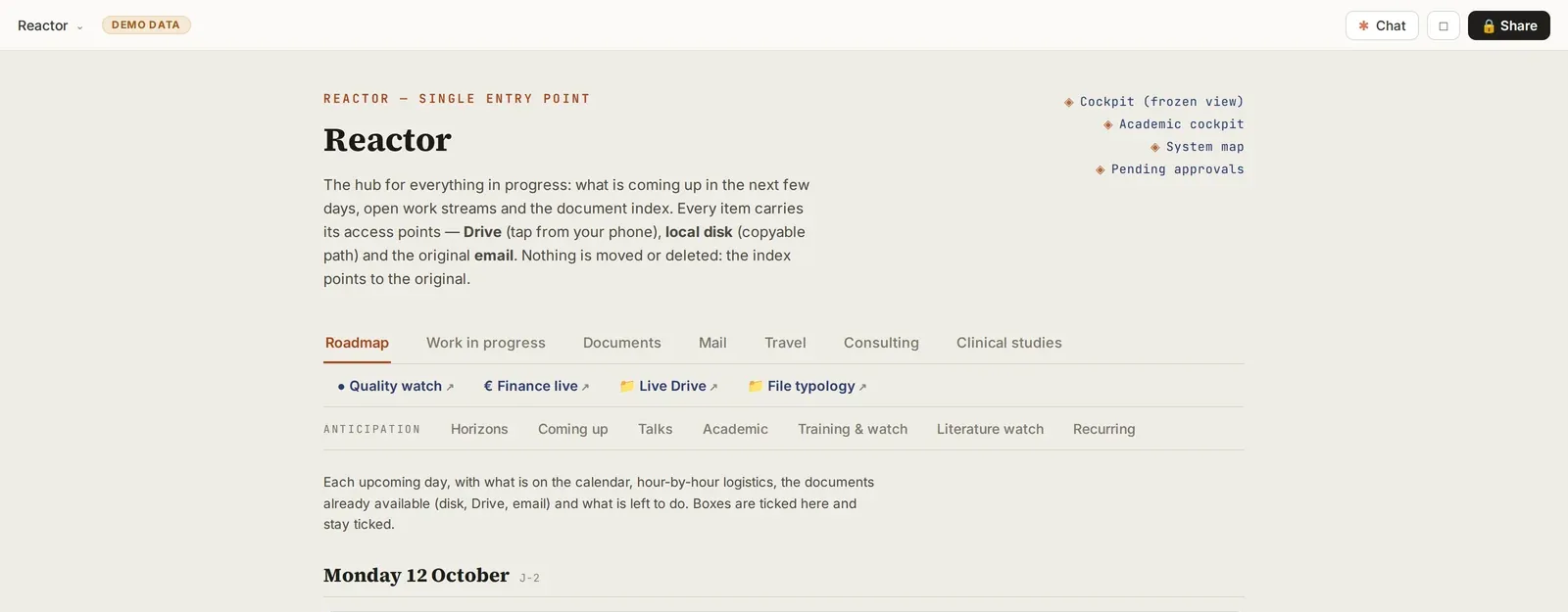
Screenshot of a real tool · fictitious data, names blurred
The problem
A conference in three weeks, a thesis defense in ten days, a thesis report to submit, the start of a DIU (inter-university diploma) year: each of these deadlines lives in a different tool. You discover the day before what you should have prepared the month before.
Step-by-step method
- Create an artifact backed by a database (the artifacts’ “database” capability). It does not store documents: it points to them (Drive link, disk path, original email). The same document can have several access points (shared space, disk, email); a missing one is shown with a dotted outline rather than hidden.
- First row of tabs, the operational side:
- Roadmap: day by day, the calendar, logistics, documents ready, a checklist;
- Work in progress: each project is linked to a file, with a status of open / in progress / postponed / done (never deleted);
- Documents: the consolidated index;
- Mail: what the sorting has kept, with your decisions.
- Second row, anticipation: horizons (day, week, month, semester), deadlines to anticipate, upcoming presentations, literature watch, recurring administrative tasks.
- Seed it: ask Claude to cross-check six months of calendar and email to list candidate events and documents; for each one, you choose “index”, “extract” or “discard” on an approval page.
- Feed it automatically: the morning run writes the roadmap, the evening run updates the projects, the weekly run writes the literature watch and the horizons.
- Feed it in conversation: “add a deadline”, “update this project”.
- Write to the databases without republishing the page:
- read before writing, pinning the version you read;
- add to a section rather than replace it, and show a before/after before changing an existing line;
- never touch boxes ticked by the user: “done” is ticked on the page;
- keep the old date of a postponed milestone;
- one writer per collection: each collection has a single scheduled writer, the others propose; the orchestrators take over only if the writer has not run for several hours.
- Four display additions:
- a “new since your last visit” banner (items less than 2 days old, marked as seen after a few seconds);
- a read-error banner, so that an empty list is never shown silently;
- the age of pending decisions, which are cleared in a decision queue;
- “big days”: a milestone carries its to-do list and keywords, and every email containing them is attached to it.
- An Agents tab: one card per agent, with its tasks and their status, and the state of its learning loop (active, idle, missing).
- The tick as a command: you tick “→ slide” on the page, and the next conversation produces the slide. A scheduled task never produces anything from a tick.
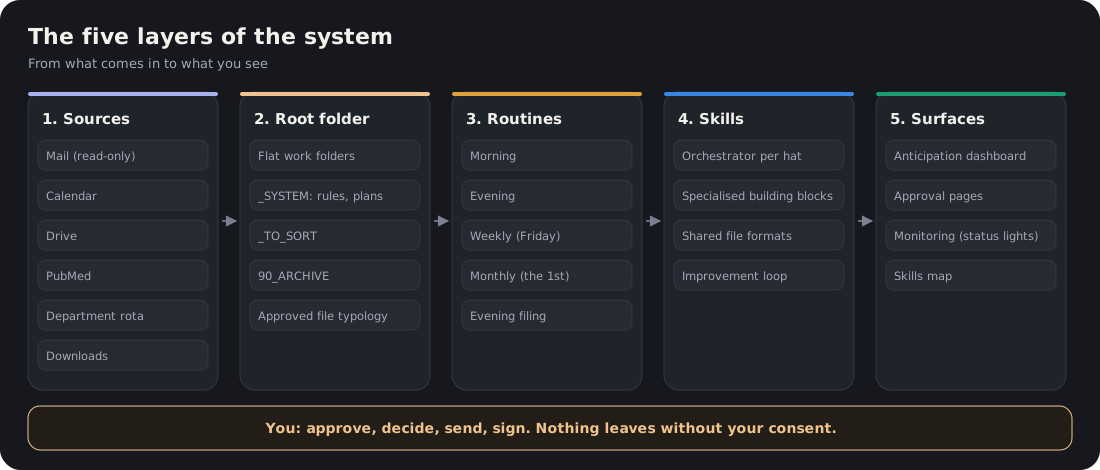
Figure. The anticipation dashboard is the last layer: it reads what the others write. See the animated map.
Deliverable
A single page, pinned, viewable on a phone, sorted by what is most urgent: alert at D-30, urgent at D-14.
Safeguards
The Reactor (anticipation dashboard) is an index: nothing is moved or deleted in it. No patient data.
Starter prompt
Create an anticipation dashboard with a database: tabs Roadmap, Work in progress, Documents, To anticipate. Seed it from my calendar and emails of the last 3 months, without writing anywhere else, and present each candidate item for me to approve.