Common foundation
Cross-checked inventory of your activity
Every two months, cross-check skills, dashboard, files and conversations to spot what is dormant, what diverges and what is missing.
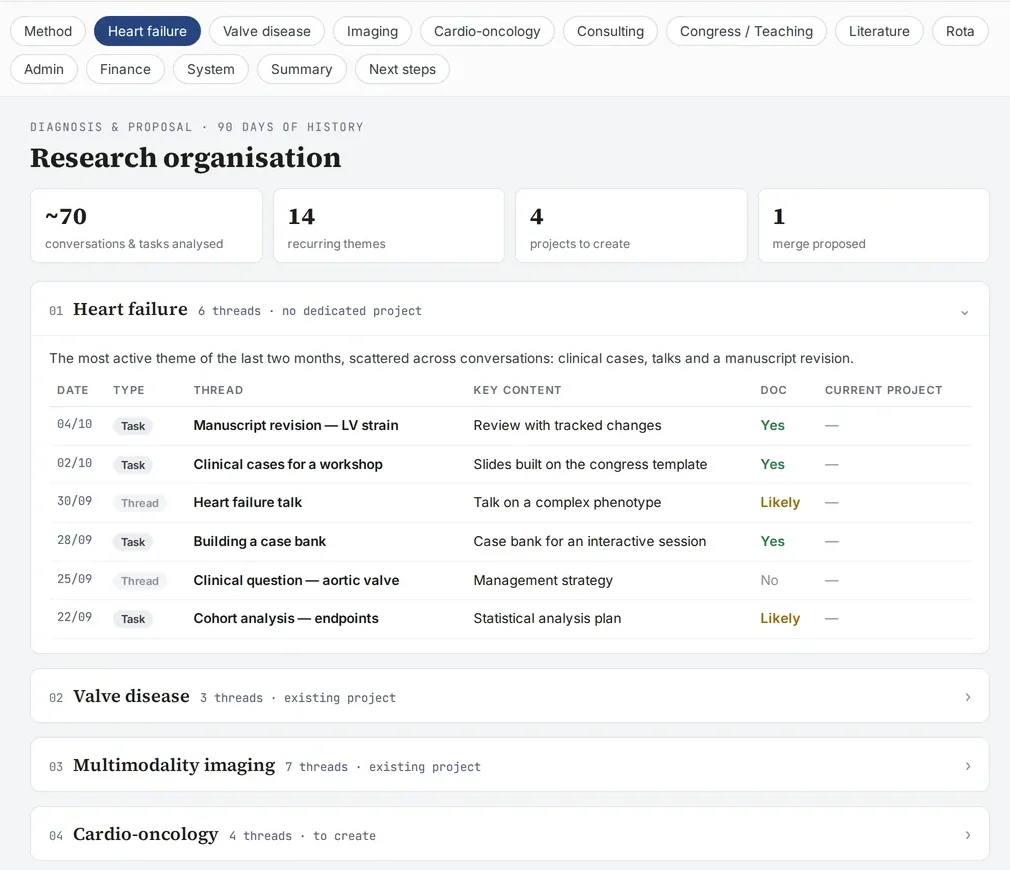
Screenshot of a real tool · fictitious data, names blurred
The problem
A system that has been running for months drifts silently: a page is no longer refreshed, an event is missing from the dashboard, a date differs between the calendar and a record, an important file has never left Downloads, a scheduled task has remained paused.
Step-by-step method
- Cross-check four sources: the skills (what is planned), the dashboard (what is tracked), the files (what exists) and the conversations (what has been done).
- Inventory by domain: for each building block, its actual use over the period (used, never used, recently created).
- Status tables by domain: manuscripts, thesis defenses, studies, conferences, department, career, teaching; each row with the known status and the next step.
- List of inconsistencies:
- frozen data (a page that still cites an old version);
- events missing from the dashboard;
- conflicting dates between two sources;
- files not filed or not replicated;
- scheduled tasks whose active or paused state is unknown.
- Declare the source limits: what the AI cannot access (some projects, some sessions) is reconstructed from traces, and it says so. The inventory also declares what it cannot see at all: folders not indexed, missing connectors, periods not covered.
- Correct: each inconsistency becomes an action to approve; the AI also corrects its own errors from the previous inventory.
- A weekly audit with evidence, coverage and age, between two inventories:
- each finding carries evidence (identifier, date, figure), and never a “nothing to report” without saying what was read;
- email coverage is measured on a sample of 10 received and 10 sent messages: red below 80% of messages properly followed up, orange below 95%;
- each project gets a status: active, on hold (with its reason), drifting, dormant (2 to 6 weeks without a trace), abandoned in practice (beyond that);
- each alert carries its age; at 3 weeks, a question: follow up, put on hold or archive;
- a single notification, and only if there is one red or three orange;
- a false positive is corrected in the check itself, not only in the report.
- A system decisions page:
- one card per question: verified finding, question, options including a “recommended” one, nature (safeguard, failure, duplicate, usage, connector);
- answers are saved as you go, with a “copy my answers” button as a fallback;
- nothing is changed before the answer.
Going further
- Diagnosing and repairing a system that no longer talks to itself
- Finding anything
- The quality loop: check, assess, learn
Deliverable
A dated inventory, by domain, with the list of inconsistencies and actions. It is also the raw material for the annual activity report.
Safeguards
Consulting and finances are outside the scope of the academic inventory. No correction is applied without approval.
Starter prompt
Take an inventory of my academic activity over the last two months by cross-checking my skills, my dashboard, my files and our conversations. By domain: actual use of the building blocks, status of each file, next step. End with the list of inconsistencies and source limits.