Common foundation
Organising your skills into hats (roles)
One orchestrator per role that routes to specialised building blocks: your know-how becomes reusable, by you and by others.
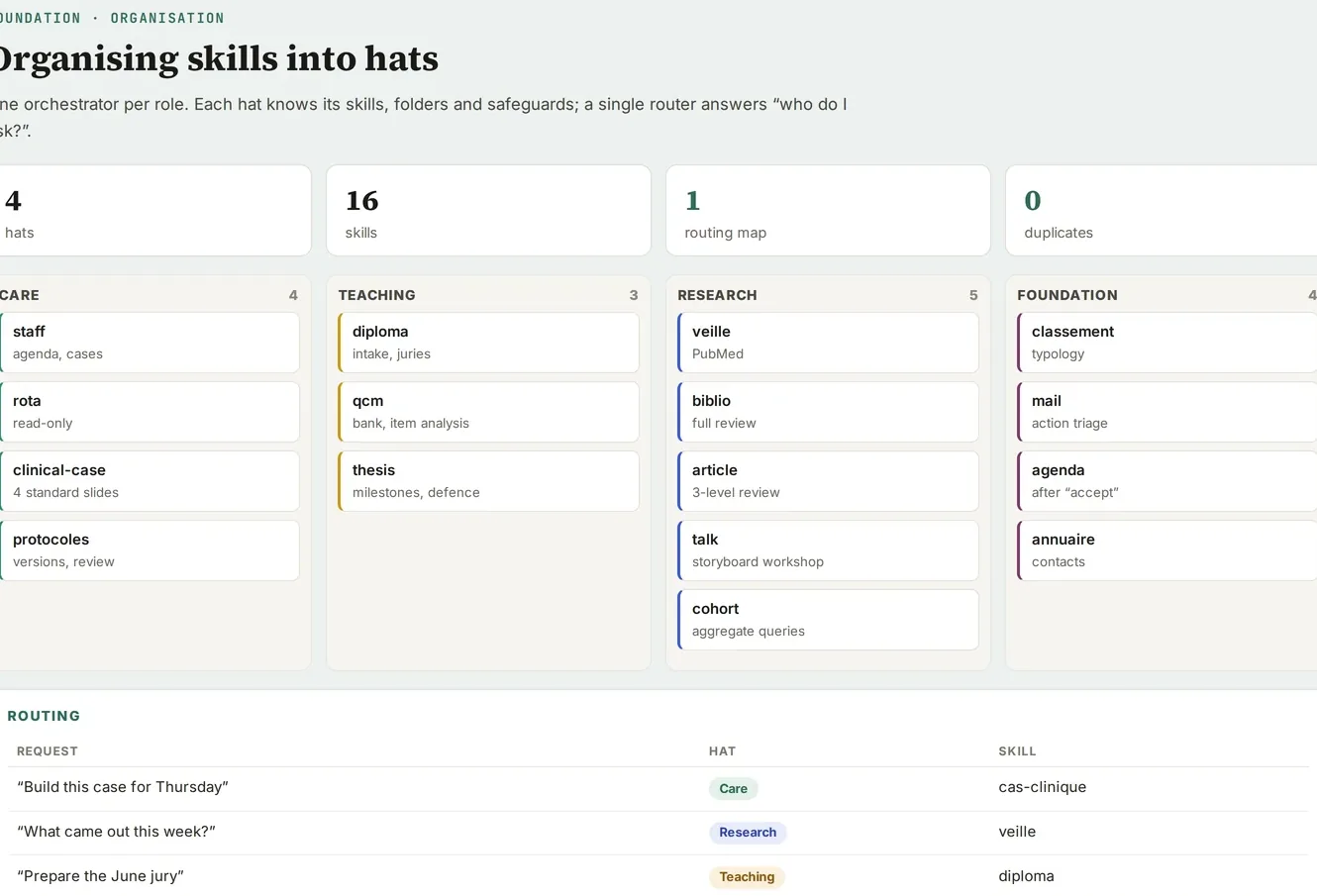
Screenshot of a real tool · fictitious data, names blurred
The problem
Every time you explain to Claude how to review a thesis or build a slide in your template, you start from scratch. And once you have several dozen sets of instructions, nobody knows which one to trigger.
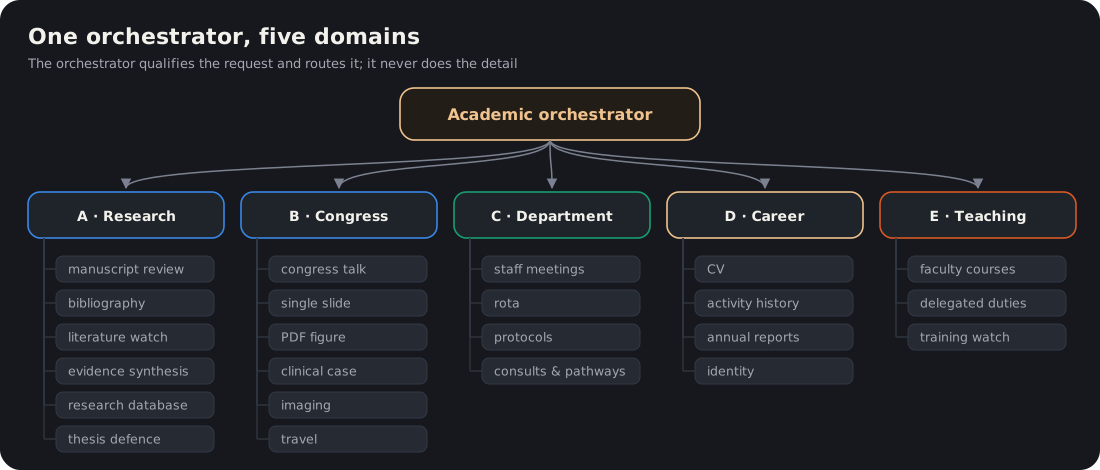
Figure. The orchestrator routes to the domains and their building blocks.
Step-by-step method
-
Write a skill as soon as a piece of know-how repeats three times: an instruction file with its trigger phrases (“review this thesis”, “build this case”), its steps, its deliverable and its safeguards.
-
Group them into hats (roles): one orchestrator per hat (academic, department, data-driven research…). It qualifies the request and routes to a building block, never doing the detailed work itself.
-
Declare the boundaries: what each hat excludes, and which other skill it hands over to.
-
Create one Claude Project per domain to keep conversation context (Academic, Department, Research).
-
Keep a skills map (an artifact): which skill, which trigger, which mission, which status.
-
Have changes proposed as “cards to approve”, in small batches, rather than letting the AI rewrite its own skills.
-
Package what is stable as a plugin, to reinstall it on a new computer or share it with a colleague. Changing computers takes preparation:
- sort things into three families: what travels on disk (folders, databases, rule files); what comes back on its own with the account (skills, tasks, artifacts); what has to be redone by hand (connections, mounted drives, permissions);
- check the copy by recounting on both sides (number of files and size per folder);
- watch the name of the user folder: that is the real risk, because every path depends on it;
- as long as both machines are producing, keep a single master; the other one receives new items incrementally, in “cautious” mode (only adds what is missing) or “update” mode (never overwrites a more recent file);
- recreate the tasks tied to the machine and check their time zone (the clock change can shift them);
- retire the old machine, without wiping it, after one full monthly cycle.
-
A weekly learning loop: each week, Claude rereads the corrections you made and proposes a bundle of skill updates, which you install yourself after reading them. The details are in the guide The learning loop.
-
One “hat” page per role: a hierarchy tab (orchestrator, domains, building blocks), one tab per domain with the status of its files, a skills and scheduled tasks tab, and the list of what remains outside.
-
Tidy up the collection: an alias or a duplicate is archived (never deleted); a building block shared between two hats is declared as such; a variant distributed to others never overwrites your personal version; format skills (Word, PowerPoint, Excel, PDF) remain cross-cutting.
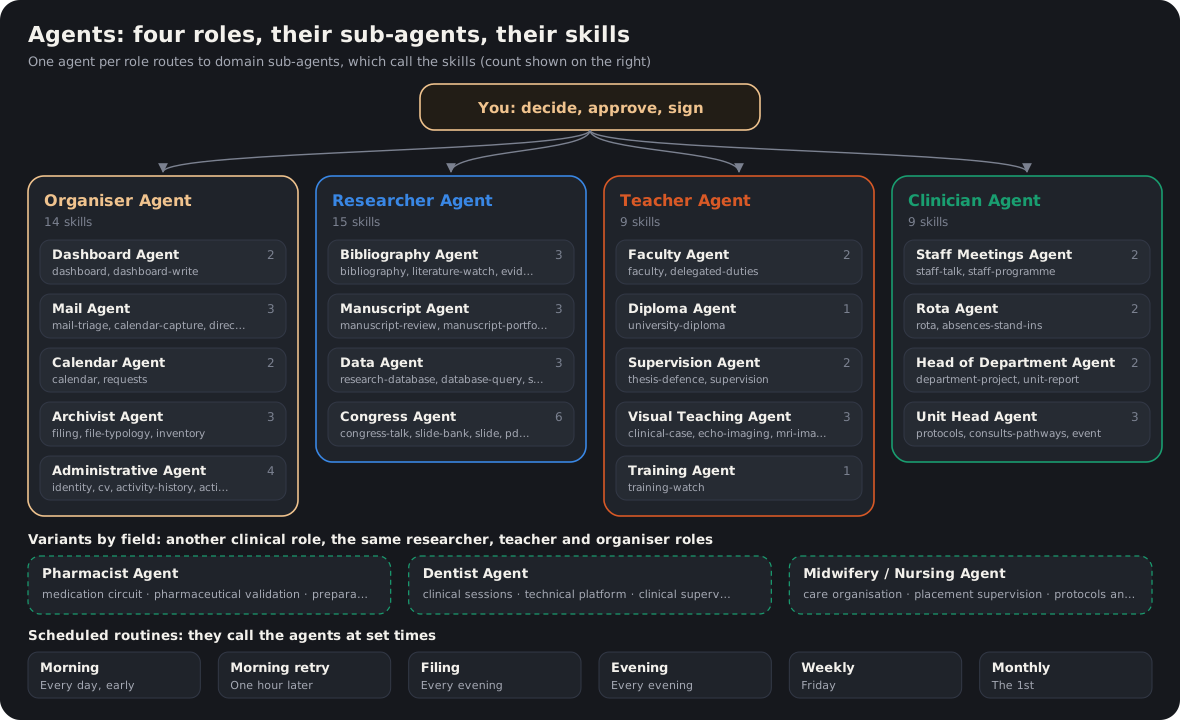
Figure. The agents and their skills: see the Agents page.
Several agents working together
- A shared project register, read first by every agent: a sub-agent starts with a blank memory and does not see the other conversations. The register (project, status, folder, next step, agent in charge) gives it the context in a single read.
- Two delegation modes: direct handover, where a single agent handles the request from start to finish; or the conductor, who launches several agents in parallel and then gathers their deliverables. The second costs roughly ten times more than a conversation, so keep it for broad tasks (a review along several lines, a complete inventory). A sub-agent does not launch other sub-agents itself: the orchestrator hands out the work.
- Cross-cutting areas of expertise: an agents × research themes matrix (for example “sleep and performance”, “simulation in teaching”, “real-world data”). Each area has a one-page “area brief” (question, sources, current projects, upcoming deadlines) that every agent reads before working on that theme.
- One contract per agent, written before it is built: what it does, what it excludes, what it delivers. Then a test bench of about twenty real requests, with the expected answer (which agent, which deliverable), replayed after every change.
- A seven-stage cycle: input (an email, a file, a sentence) → orchestrator (qualifies and routes) → agent (executes) → output (deliverable in an approval area) → approval (you) → audit (a separate check confirms that everything closed) → lesson (what was learned goes back into the skill).
- A “bridge” hat when a domain is transferred to another project: it stays visible, read-only. Bridges go through the index, the links and the log, never through copies. The old tab is frozen and dated.
Auditing and slimming down your skills
Remove before you add. The diagnosis is almost always the same: successive layers of instructions, never removed, which end up contradicting each other.
- Measure the size of each skill and start with the longest.
- Bring each description down to 40–60 words: the purpose, 5 to 8 triggers, one exclusion. A long description blurs the routing; a very short one triggers too rarely.
- One source per rule: rules scattered across several skills move into a shared rules file, which the skills cite.
- Date the exceptions to safeguards and keep them in that rules file, never in the body of a skill.
- One status line at the top of each skill: version, date, active or retired, the skill that replaces it.
- Sort the failures you record by root cause (trigger, missing rule, missing source, conflict between skills) rather than fixing them one by one.
First job: switch off, merge and archive. Never delete.
Deliverable
A skills library organised by role, a readable map, one project per domain.
Starter prompt
Analyse my conversations from the last two months, group them by theme, and for each theme propose: create a project, create a skill, or nothing. Present it in a table for me to approve, without changing anything.